From API to Database: Dockerized Airflow ETL Pipeline for Weather Data
  ____________       _____________
 ____    |__( )_________  __/__  /________      __
____  /| |_  /__  ___/_  /_ __  /_  __ \_ | /| / /
___  ___ |  / _  /   _  __/ _  / / /_/ /_ |/ |/ /
 _/_/  |_/_/  /_/    /_/    /_/  \____/____/|__/

📌 Overview
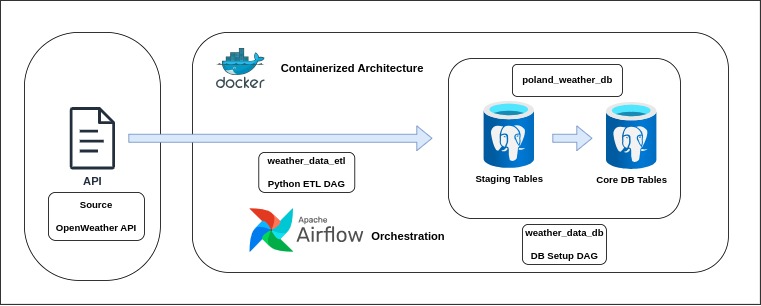
This project implements an ETL pipeline to fetch weather data from the OpenWeather API about main Polish cities, transform it and load the processed data into a PostgreSQL database.
The pipeline is orchestrated with Apache Airflow, which allows scheduled execution each step of the pipeline.
The entire workflow is containerized and deployed using a multi-container Docker Compose setup ensuring easy reproducibility, scalability, and isolation of services such as Airflow, PostgreSQL and supporting components.
The purpose of this project is to build a fully automated ETL pipeline for weather data using Apache Airflow for orchestration and Docker for containerized deployment.
⚙️ DAGs Overview
The setup consists of two DAGs:
-
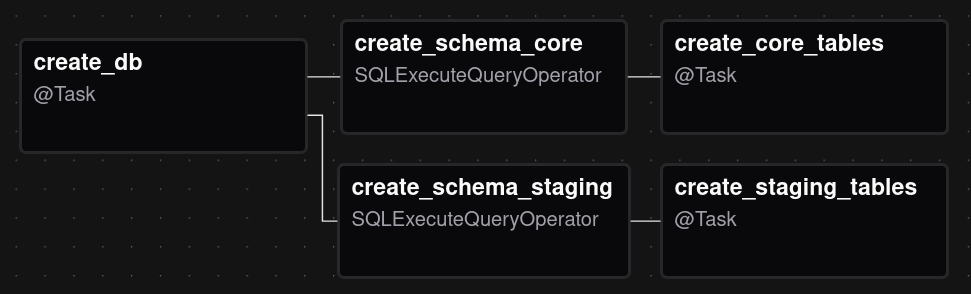
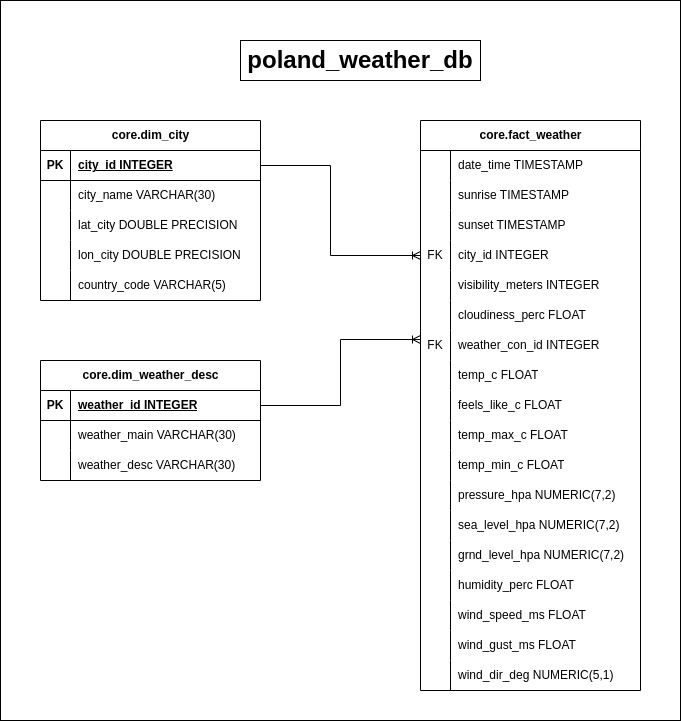
weather_data_db – Responsible for setting up the PostgreSQL backend database, creating separate schemas(staging and core), and creating the tables needed for both the staging step and the final database.
-
weather_data_etl – The full ETL process: checking the OpenWeather API, extracting weather data for multiple Polish cities, transforming it into structured DataFrames, and loading it into both staging and core tables.
⚙️ weather_data_db – Database Setup DAG
The db DAG scheduled to run every day before the main ETL pipeline to ensure an existing backend for the ETL pipeline properly initialized and to facilitate easier schema modifications.
- Create Database – poland_weather_db if it doesn’t exist.
- Create Schemas – staging and core.
- Create Tables – Staging tables and core tables.
⚙️ weather_data_etl – ETL Pipeline DAG
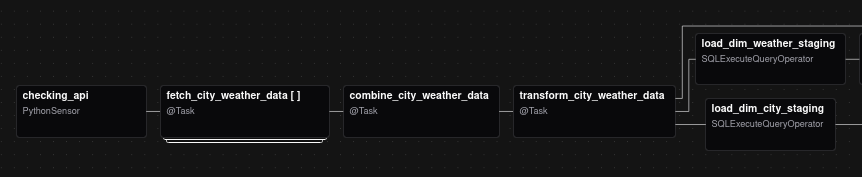
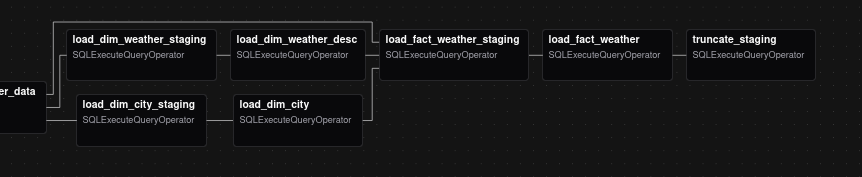
The main ETL DAG scheduled to run every day at 6:00 CET. Extract, transform, and load weather data into the database. The dag leverages TaskFlow API, dynamic task mapping and XCOMs to pass data between tasks.
- API Check – Verify OpenWeather API availability.
- Extract Data – Extracts weather data.
- Combine Data – Combining datasets of separate cities into one file.
- Transform Data – Process JSON into DataFrames: df_dim_city, df_dim_weather_desc, df_fact_weather.
- Load to Staging – Load CSV data into staging tables.
- Load to Core – Populate core tables from staging.
- Clean Staging – Truncate staging tables after successful ETL run.
▶️ How to Run
Clone the repository and navigate into it
git clone <repo-url>
cd <project-directory>
Create necessary folders for Airflow
mkdir -p ./logs ./plugins ./config
Create Airflow user ID
echo -e "AIRFLOW_UID=$(id -u)" > .env
Start the Airflow environment with Docker Compose
docker compose up -d --build
Access the Airflow Web UI via http://localhost:8080 in your browser.
Default Credentials:
Username: airflow
Password: airflow
Additionally, set up an Airflow Variable called open_weather_api through the Airflow Web UI to store your OpenWeather API key and create two Airflow connections in the Web UI: postgres_conn to access the main PostgreSQL DB and postgres_weather_db for the weather database.
🗃️ ERD Diagram
🧰 Tech Stack
- Docker and Docker Compose
- Apache Airflow 3.0.3
- PostgreSQL
- Python
- Pandas
- SQL
📁 Repository Structure
├── dags
│   ├── weather_db.py
│   └── weather.py
├── data
│   ├── df_dim_city.csv
│   ├── df_dim_weather_desc.csv
│   └── df_fact_weather.csv
├── docker-compose.yaml
├── docs
│   ├── poland_weather_db.jpg
│   ├── weather_data_architecture.jpg
│   ├── weather_db.png
│   ├── weather_etl_1.png
│   └── weather_etl_2.png
├── LICENSE
├── README.md
└── src
    ├── check_api.py
    ├── create_weather_db.py
    ├── extract_data.py
    ├── __init__.py
    └── transform_data.py
🔗 References
-
Docker https://docs.docker.com/
-
Apache Airflow https://airflow.apache.org/
-
PostgreSQL https://airflow.apache.org/docs/
-
Python https://www.python.org/doc/